Anyone who has maintained a large Android UI test suite knows the pain of brittle view selectors. Whether you use Espresso, UI Automator, or Appium, traditional mobile automation scripts couple test steps directly to implementation details: R.id.checkout_button, XPath chains, or hardcoded test tags.
The moment a feature team refactors a screen from XML Views to Jetpack Compose, runs an A/B layout experiment, or adopts Server-Driven UI, those selectors break. Engineers end up spending more time fixing broken locators than catching real regressions.
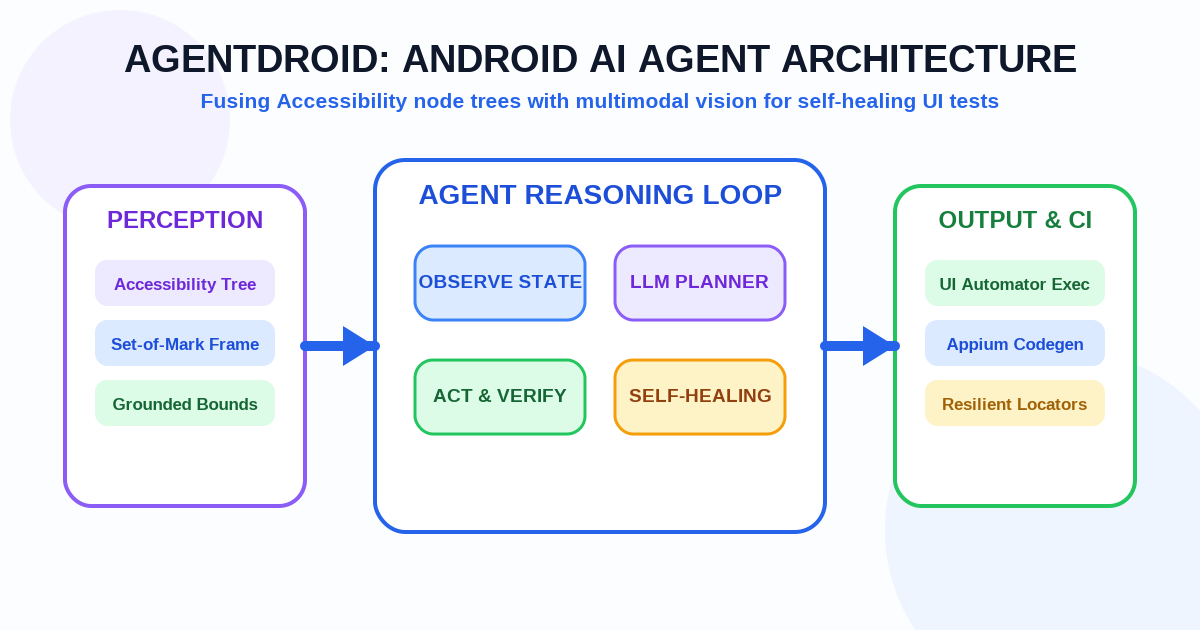
I built AgentDroid to solve this problem at the root: replacing fragile selector scripts with a multimodal Android AI agent that perceives and navigates mobile screens the way a human user does, and compiles verified runs into deterministic Appium test code.
Key Takeaways
- Relying solely on raw screenshots forces vision models to guess coordinates; relying solely on XML accessibility trees misses custom canvas views and unlabelled Compose nodes.
- Fusing pruned Android Accessibility node bounds with Set-of-Mark visual overlays gives multimodal LLMs deterministic, pixel-accurate grounding.
- Running an
Observe -> Reason -> Act -> Verifyloop lets tests self-heal through unexpected permission dialogs, promotional modals, and layout shifts. - Recording validated agent trajectories into reproducible Appium code gives teams AI flexibility during authoring and fast, deterministic execution in CI.
Why Pure Vision or Pure XML Fails on Android
When I started prototyping AgentDroid, I tested two common approaches:
- Pure Accessibility / UI Automator XML Dumps: Raw Android hierarchy dumps frequently exceed 15,000 tokens of nested container noise (
FrameLayout, non-interactive wrapper nodes), and Jetpack Compose screens with custom drawing or merged semantics often lack unique resource IDs. - Pure Screenshot Vision Models: Multimodal LLMs are great at understanding what is on a screen, but asking an LLM to predict raw
(x, y)tap coordinates on a1080x2400phone display leads to frequent off-by-40-pixel misses.
The breakthrough was combining both signals into a unified Grounded Screen Representation.
1. Semantic Tree Pruning & Set-of-Mark Visual Grounding
On every step of the agent loop, AgentDroid captures both the live Accessibility / UI Automator tree and a compressed screenshot, then runs a fast pruning and indexing pass:
data class GroundedUiElement(
    val index: Int,
    val className: String,
    val text: String?,
    val contentDescription: String?,
    val resourceId: String?,
    val bounds: Rect,
    val isClickable: Boolean,
    val isEditable: Boolean,
    val isScrollable: Boolean
)

class ScreenGroundingPipeline {
    fun buildGroundedState(
        rootNode: AccessibilityNodeIndex,
        screenshot: Bitmap
    ): GroundedScreenState {
        val interactiveElements = rootNode
            .flattenVisibleNodes()
            .filter { node ->
                node.isVisibleToUser &&
                    (node.isClickable || node.isEditable || node.isScrollable || !node.text.isNullOrBlank())
            }
            .mapIndexed { idx, node ->
                GroundedUiElement(
                    index = idx + 1,
                    className = node.shortClassName,
                    text = node.text,
                    contentDescription = node.contentDescription,
                    resourceId = node.viewIdResourceName,
                    bounds = node.boundsInScreen,
                    isClickable = node.isClickable,
                    isEditable = node.isEditable,
                    isScrollable = node.isScrollable
                )
            }

        val annotatedFrame = VisualMarkerOverlay.drawIndexedBadges(
            source = screenshot,
            elements = interactiveElements
        )

        return GroundedScreenState(
            elements = interactiveElements,
            annotatedScreenshot = annotatedFrame
        )
    }
}
Instead of guessing pixel coordinates, the multimodal model sees numbered bounding-box badges ([1], [2], [3]) overlaid directly on the screenshot alongside a compact JSON table of those exact elements. The model simply outputs Tap(elementIndex = 4), and AgentDroid dispatches the gesture to the exact center of element 4's hardware bounding box.
2. The Self-Healing Observe -> Reason -> Act -> Verify Loop
In real mobile apps, user journeys are rarely linear. A cold start might trigger an Android 13 notification permission dialog, a location prompt, or a one-time "What's New" bottom sheet.
Rather than crashing when an expected button isn't immediately visible, AgentDroid evaluates each step against the high-level goal:
sealed interface AgentAction {
    data class Tap(val elementIndex: Int, val rationale: String) : AgentAction
    data class InputText(val elementIndex: Int, val text: String, val rationale: String) : AgentAction
    data class Scroll(val direction: ScrollDirection, val rationale: String) : AgentAction
    data class NavigateBack(val rationale: String) : AgentAction
    data class AssertVisible(val expectedCondition: String) : AgentAction
    data class Complete(val summary: String) : AgentAction
}
After executing an action, the agent waits for UI idle (monitoring Accessibility window content changes and frame stability) and verifies whether the screen state progressed toward the goal. If a system permission modal intercepted the tap, the agent recognizes the modal, dismisses or grants it according to policy, and resumes the user flow automatically.
3. Compiling Agent Trajectories into Deterministic Appium Code
Running an LLM in the loop on every CI commit can be slow and expensive. To make AgentDroid practical for high-velocity mobile teams, I built a Trajectory-to-Appium Compiler.
Once AgentDroid completes a goal and verifies the assertions, it exports the recorded trajectory into a clean Appium test script containing ranked, multi-attribute fallback locators (accessibilityId -> resourceId -> text -> UiSelector) so CI pipelines can replay the test in seconds - and only invoke the AI self-healing loop when a UI redesign invalidates an existing locator.
You can explore the source code and architecture in the AgentDroid repository on GitHub.
Related posts.
Architecting Server-Driven UI (SDUI) in Jetpack Compose at 60fps
How to design a production Server-Driven UI engine on Android with Kotlin, Jetpack Compose, schema-validated contracts, offline-first caching, and 60fps rendering telemetry.
Handling App Complexity Without Over-Engineering
How I manage growing complexity in Android apps without falling into the trap of building abstractions nobody asked for.
Jetpack Compose Architecture Patterns That Scale
Practical architecture patterns for Jetpack Compose that work in real production Android apps at scale, covering state hoisting, navigation, and modularity.