Jetpack Compose Architecture Patterns That Scale
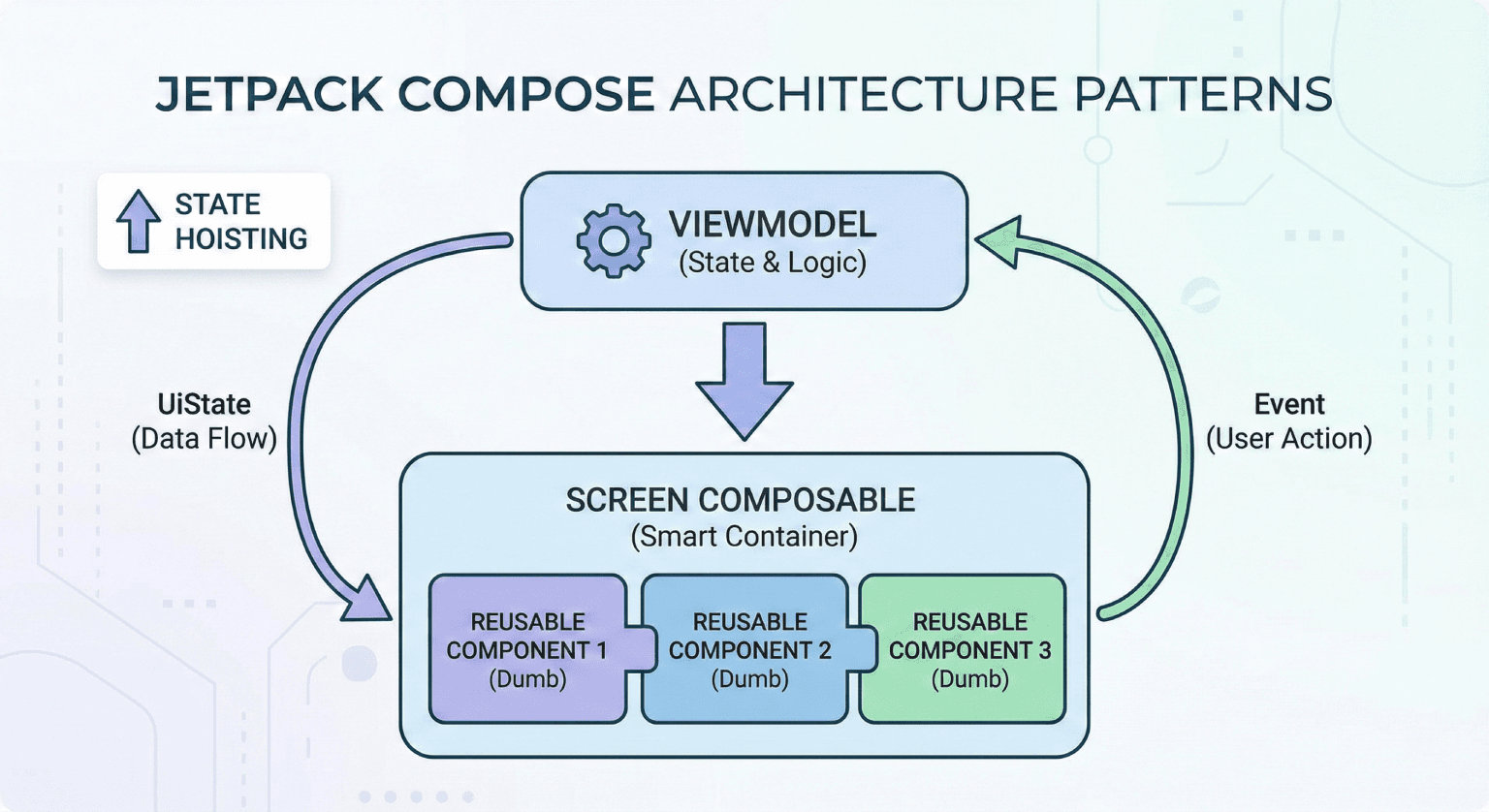
Jetpack Compose changed how we build Android UIs, but it didn't change the need for solid architecture. If anything, Compose makes architecture more important because it's so easy to put logic in the wrong place.
Key Takeaways
- Composables should be dumb - they render state, they don't manage it.
- Unidirectional data flow prevents an entire category of bugs.
- State hoisting is the most important pattern in Compose.
- Screen-level composables and reusable components serve different roles.
The Problem With Putting Logic in Composables
It starts innocently. You add a remember { mutableStateOf(...) } for a toggle. Then a LaunchedEffect to fetch data. Then another remember for form validation. Before you know it, your composable is 200 lines of mixed UI and business logic.
// This is how spaghetti starts
@Composable
fun ArticleScreen() {
    var articles by remember { mutableStateOf<List<Article>>(emptyList()) }
    var isLoading by remember { mutableStateOf(true) }
    var error by remember { mutableStateOf<String?>(null) }

    LaunchedEffect(Unit) {
        try {
            articles = api.fetchArticles()
        } catch (e: Exception) {
            error = e.message
        } finally {
            isLoading = false
        }
    }

    // 150 more lines of UI mixed with logic...
}
Pattern 1: Unidirectional Data Flow
The foundation of every scalable Compose architecture. State flows down, events flow up:
// UI State - single source of truth
data class ArticleUiState(
    val articles: List<Article> = emptyList(),
    val isLoading: Boolean = true,
    val error: String? = null
)

// ViewModel manages state
class ArticleViewModel @Inject constructor(
    private val repository: ArticleRepository
) : ViewModel() {

    private val _uiState = MutableStateFlow(ArticleUiState())
    val uiState: StateFlow<ArticleUiState> = _uiState.asStateFlow()

    init { loadArticles() }

    fun onRetry() { loadArticles() }

    private fun loadArticles() {
        viewModelScope.launch {
            _uiState.update { it.copy(isLoading = true, error = null) }
            repository.getArticles()
                .onSuccess { articles ->
                    _uiState.update { it.copy(articles = articles, isLoading = false) }
                }
                .onFailure { e ->
                    _uiState.update { it.copy(error = e.message, isLoading = false) }
                }
        }
    }
}

// Composable just renders state
@Composable
fun ArticleScreen(viewModel: ArticleViewModel = hiltViewModel()) {
    val uiState by viewModel.uiState.collectAsStateWithLifecycle()

    ArticleContent(
        state = uiState,
        onRetry = viewModel::onRetry
    )
}
Pattern 2: State Hoisting
State hoisting means moving state up to the caller. This makes composables reusable and testable:
// Stateful - owns its state (used at the screen level)
@Composable
fun SearchBar() {
    var query by remember { mutableStateOf("") }
    SearchBarContent(query = query, onQueryChange = { query = it })
}

// Stateless - receives state (reusable anywhere)
@Composable
fun SearchBarContent(
    query: String,
    onQueryChange: (String) -> Unit,
    modifier: Modifier = Modifier
) {
    OutlinedTextField(
        value = query,
        onValueChange = onQueryChange,
        modifier = modifier,
        placeholder = { Text("Search...") }
    )
}
The stateless version can be used in previews, tests, and different screens without modification.
Pattern 3: Screen vs. Component Composables
I split composables into two categories:
Screen composables - connected to ViewModels, handle navigation, one per route:
@Composable
fun ProfileScreen(
    viewModel: ProfileViewModel = hiltViewModel(),
    onNavigateToSettings: () -> Unit
) {
    val state by viewModel.uiState.collectAsStateWithLifecycle()
    ProfileContent(state = state, onSettingsClick = onNavigateToSettings)
}
Component composables - pure UI, no ViewModel dependency, reusable:
@Composable
fun UserCard(
    name: String,
    avatarUrl: String,
    onClick: () -> Unit,
    modifier: Modifier = Modifier
) { /* Pure UI rendering */ }
Pattern 4: Side Effects Done Right
Compose has specific APIs for side effects. Using the wrong one causes subtle bugs:
// LaunchedEffect - runs when keys change
LaunchedEffect(userId) {
    viewModel.loadUser(userId)
}

// DisposableEffect - cleanup when leaving composition
DisposableEffect(lifecycleOwner) {
    val observer = LifecycleEventObserver { _, event -> /* ... */ }
    lifecycleOwner.lifecycle.addObserver(observer)
    onDispose { lifecycleOwner.lifecycle.removeObserver(observer) }
}

// rememberCoroutineScope - for event handlers (not composition)
val scope = rememberCoroutineScope()
Button(onClick = {
    scope.launch { viewModel.submitForm() }
}) { Text("Submit") }
Pattern 5: Navigation With Type Safety
// Define routes as sealed class
sealed class Route(val path: String) {
    data object Home : Route("home")
    data object Profile : Route("profile/{userId}") {
        fun create(userId: String) = "profile/$userId"
    }
}
Final Thought
The best Compose architecture is the one your team can follow consistently. Pick patterns that are simple enough to be applied everywhere and strict enough to prevent the common mistakes. Complexity should live in your domain logic, not in your UI layer.
Related posts
Handling App Complexity Without Over-Engineering
How I manage growing complexity in Android apps without falling into the trap of building abstractions nobody asked for.
State Management in Jetpack Compose: What Works in Practice
A practical guide to managing state in Jetpack Compose for production Android apps. What patterns I use, what I avoid, and why simplicity wins at scale.
My Principles for Writing Maintainable Android Code
Code that works today but can't be changed tomorrow is tech debt waiting to happen. Here are the principles I follow to write Android code that lasts.