Common Android Architecture Mistakes (and How I Avoid Them)
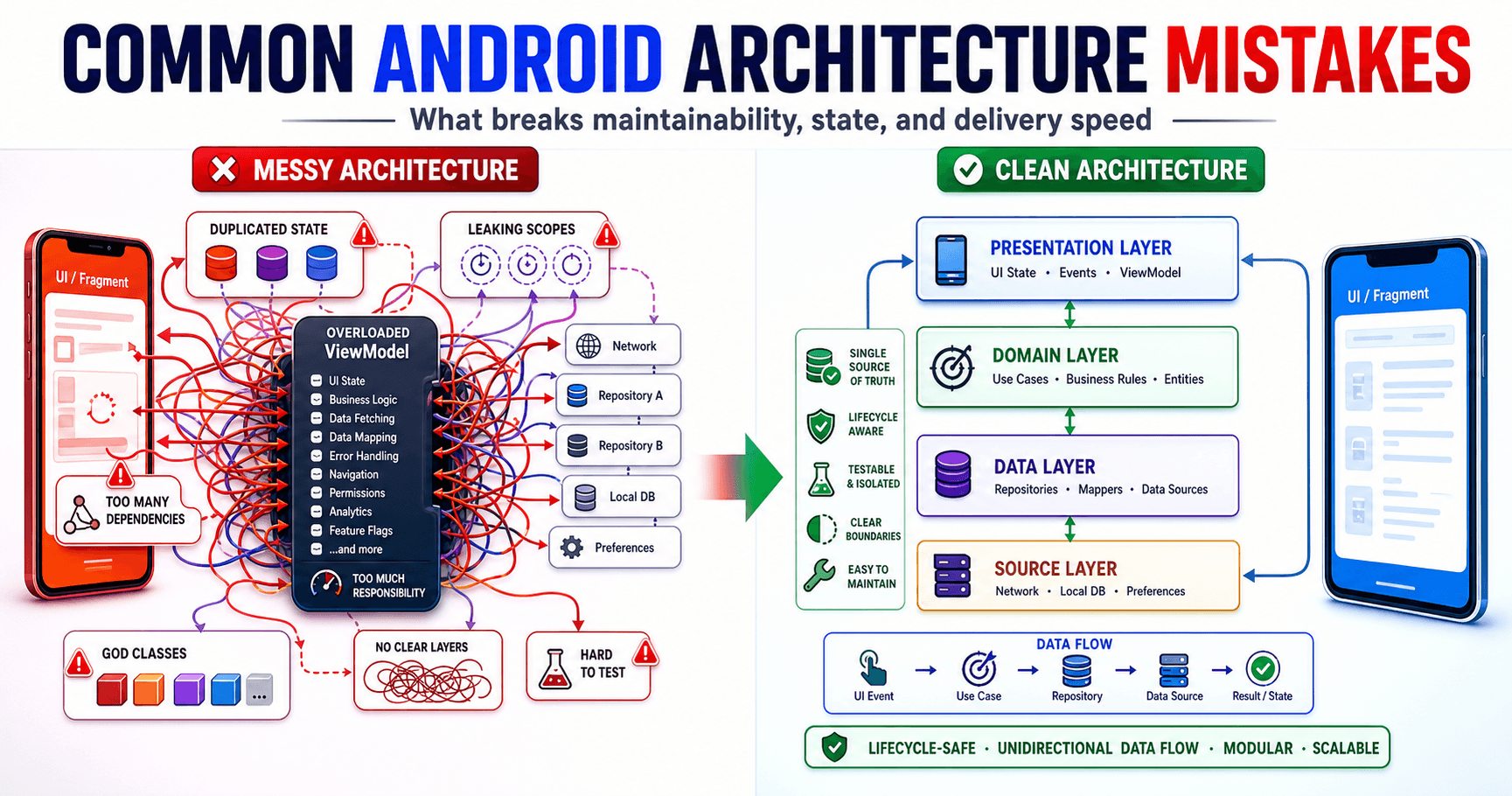
After working on multiple Android codebases across different teams and companies, I've noticed the same architecture mistakes appearing again and again. Here are the five most common ones and how I avoid them.
Key Takeaways
- Fat ViewModels are the new fat Activities.
- Not every piece of state belongs in the ViewModel.
- Repository pattern is only useful if it actually abstracts something.
- Ignoring process death leads to production bugs that are nearly impossible to reproduce.
- Over-modularizing too early slows you down without clear benefit.
Mistake 1: The God ViewModel
The most common mistake I see. Teams move away from fat Activities, only to create fat ViewModels instead.
// A ViewModel doing way too much
class HomeViewModel : ViewModel() {
    fun loadFeed() { /* ... */ }
    fun loadNotifications() { /* ... */ }
    fun loadUserProfile() { /* ... */ }
    fun trackImpression(item: FeedItem) { /* ... */ }
    fun handleDeepLink(uri: Uri) { /* ... */ }
    fun refreshToken() { /* ... */ }
    fun validateSession() { /* ... */ }
}
How I avoid it: One ViewModel per screen, one responsibility per ViewModel. If the ViewModel needs to coordinate multiple data sources, that coordination lives in a use case class:
class LoadHomeDataUseCase @Inject constructor(
    private val feedRepo: FeedRepository,
    private val notificationRepo: NotificationRepository,
    private val userRepo: UserRepository
) {
    suspend operator fun invoke(): HomeData {
        return coroutineScope {
            val feed = async { feedRepo.getFeed() }
            val notifications = async { notificationRepo.getUnread() }
            val user = async { userRepo.getCurrentUser() }
            HomeData(feed.await(), notifications.await(), user.await())
        }
    }
}
Mistake 2: Ignoring Process Death
Android can kill your process at any time when the app is in the background. When the user returns, the system recreates your Activity and ViewModel - but any in-memory state is gone.
I've seen this cause real production issues: users fill out a long form, switch to another app to copy a reference number, and come back to an empty form.
How I avoid it:
class FormViewModel @Inject constructor(
    private val savedStateHandle: SavedStateHandle
) : ViewModel() {
    // Survives process death
    var name by savedStateHandle.saveable { mutableStateOf("") }
        private set

    var email by savedStateHandle.saveable { mutableStateOf("") }
        private set

    fun updateName(value: String) { name = value }
    fun updateEmail(value: String) { email = value }
}
Mistake 3: Repository Pattern Without Purpose
I often see repositories that are just pass-through layers:
// This repository adds no value
class UserRepository @Inject constructor(
    private val api: UserApi
) {
    suspend fun getUser(id: String): User = api.getUser(id)
    suspend fun updateUser(user: User) = api.updateUser(user)
}
If your repository just forwards calls to the API, it's boilerplate, not architecture.
When a repository earns its keep:
class UserRepository @Inject constructor(
    private val api: UserApi,
    private val cache: UserDao,
    private val prefs: UserPreferences
) {
    fun observeUser(id: String): Flow<User> {
        return cache.observeUser(id)
            .onStart { refreshFromNetwork(id) }
    }

    private suspend fun refreshFromNetwork(id: String) {
        try {
            val user = api.getUser(id)
            cache.upsert(user)
        } catch (_: IOException) {
            // Cache serves as fallback
        }
    }

    suspend fun logout() {
        prefs.clearSession()
        cache.clearAll()
    }
}
Now the repository is coordinating between multiple data sources and providing a unified API. That's valuable abstraction.
Mistake 4: Leaking Coroutine Scopes
// Dangerous: coroutine outlives the ViewModel
class BadViewModel : ViewModel() {
    fun saveData(data: Data) {
        GlobalScope.launch {
            repository.save(data)
        }
    }
}

// Safe: tied to ViewModel lifecycle
class GoodViewModel : ViewModel() {
    fun saveData(data: Data) {
        viewModelScope.launch {
            repository.save(data)
        }
    }
}
GlobalScope coroutines run until they finish or the process dies. They can't be cancelled, which leads to memory leaks and work being done after the user has left the screen.
Mistake 5: Over-Modularizing Too Early
I've joined projects with 30+ Gradle modules for an app with 5 screens. Each module had its own build configuration, dependency management, and API boundaries. Build times were slow, refactoring was painful, and nobody could explain why module boundaries were drawn where they were.
My approach: Start with a single module. Extract a module only when you have a clear reason:
- Shared library code (analytics, networking) → Extract
- Feature that's truly independent → Maybe extract
- "It feels cleaner" → Don't extract
The cost of a wrong module boundary is much higher than the cost of extracting a module later.
Final Thought
Architecture mistakes compound over time. A God ViewModel is annoying at 500 lines but paralyzing at 2,000. Ignoring process death works fine in testing but fails in production. The best time to fix an architecture mistake is before it becomes the team's default pattern.
Related posts
What I've Learned Shipping Monetization Code to Hundreds of Millions of Users
Hard-won lessons from writing code that directly impacts revenue at massive scale. What actually matters when your diff can move millions of dollars.
Why I Measure Everything Before I Optimize Anything
Optimization without measurement is guessing. And in my experience, engineers guess wrong about what's slow more often than they guess right.
The Android Performance Traps That Don't Show Up in Benchmarks
The Android performance problems that hurt users most only appear in the real world, on real devices, with real usage patterns. Here's how to catch them.