How I Approach System Design as a Mobile App Engineer
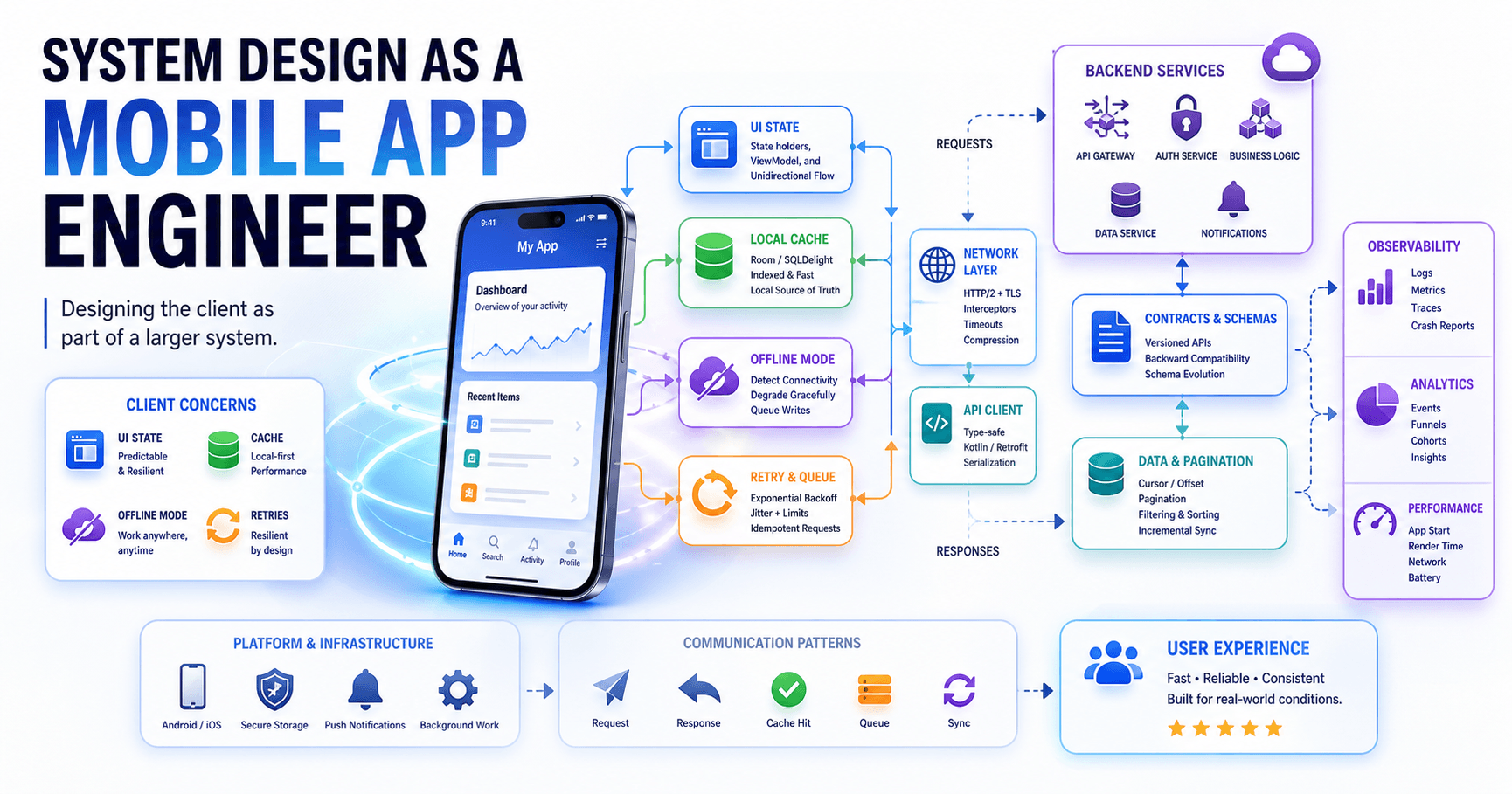
Most system design conversations happen from the backend perspective - databases, load balancers, message queues. But as a mobile engineer, I've learned that the client side has its own set of design challenges that are just as critical to get right.
Key Takeaways
- Mobile system design is about managing constraints: battery, network, memory, and user attention.
- Think in layers: UI, domain logic, data, and networking should be cleanly separated.
- Design for offline-first, not online-only.
- The best mobile architectures anticipate change without over-engineering.
Start With the User, Not the Architecture
Before I draw any diagrams, I ask three questions:
- What does the user need to do? Not what the API returns - what does the user actually see and interact with?
- What happens when things go wrong? No network, stale data, slow responses - how does the app behave?
- What changes frequently? Features that change often need flexible boundaries. Stable features can be simpler.
My Mental Model for Mobile Architecture
I think of every feature as four layers:
┌──────────────────────┐
│     UI Layer         │  Composables / Views
├──────────────────────┤
│     Domain Layer     │  Use cases, business rules
├──────────────────────┤
│     Data Layer       │  Repositories, caching
├──────────────────────┤
│     Network Layer    │  API clients, serialization
└──────────────────────┘
Each layer only talks to the one directly below it. The UI never calls the network directly. The domain layer doesn't know about Retrofit or Room.
Designing for the Real World
Mobile apps operate in hostile environments. Networks drop. Users switch between Wi-Fi and cellular. The OS kills your process to reclaim memory. Here's how I design around these realities:
Offline-First Data Flow
// Repository pattern with local-first approach
class ArticleRepository(
    private val localSource: ArticleDao,
    private val remoteSource: ArticleApi
) {
    fun getArticles(): Flow<List<Article>> {
        return localSource.observeAll()
            .onStart { refreshFromNetwork() }
    }

    private suspend fun refreshFromNetwork() {
        try {
            val remote = remoteSource.fetchArticles()
            localSource.upsertAll(remote)
        } catch (e: IOException) {
            // Local data is still served via the Flow
        }
    }
}
The user sees cached data immediately. Fresh data arrives in the background. If the network fails, the app still works.
Pagination That Doesn't Break
For lists with thousands of items, I use cursor-based pagination with Paging 3. The key insight: treat the page key as an opaque token, not a page number. This makes the API contract resilient to data changes between pages.
Trade-offs I Think About
Every design decision involves trade-offs. Here are the ones I weigh most often:
┌─────────────────────────────────────────────────────────────────────┐
│ Decision               │ Trade-off                                  │
├─────────────────────────────────────────────────────────────────────┤
│ Cache aggressively     │ Faster UX vs. stale data risk              │
│ Normalize data locally │ Consistency vs. query complexity           │
│ Use a single Activity  │ Flexibility vs. deep link complexity       │
│ Modularize by feature  │ Build speed vs. cross-feature dependencies │
└─────────────────────────────────────────────────────────────────────┘
When I Know the Design Is Right
A good mobile architecture passes three tests:
- Can a new engineer understand it in a day? If the architecture needs a 30-minute walkthrough, it's too complex.
- Can I change one feature without touching others? If fixing a bug in search breaks the feed, boundaries are wrong.
- Does it degrade gracefully? If removing the network still gives the user something useful, the design is solid.
Final Thought
System design on mobile isn't about following a textbook pattern. It's about understanding your constraints - battery, memory, network, and user patience - and making deliberate trade-offs. The best mobile architectures are the ones you barely notice because they just work.
Related posts
Ad Injection Strategies for Short-Form Video Feeds: Timing, Frequency, and Impression Recovery
How ad injection works in short-form video feeds: timing heuristics, frequency capping, impression recovery, and the trade-offs behind monetization.
From Feature to Revenue: How Ad Delivery Decisions Get Made on Mobile
How ad delivery decisions actually get made on mobile: the stakeholders, trade-offs, and engineering reality behind every ad you see in a feed.
Why Ad Format Engineering Is One of the Hardest Problems in Mobile
Ad formats look simple from the outside, but behind each one is engineering complexity touching rendering, performance, measurement, and user experience.